
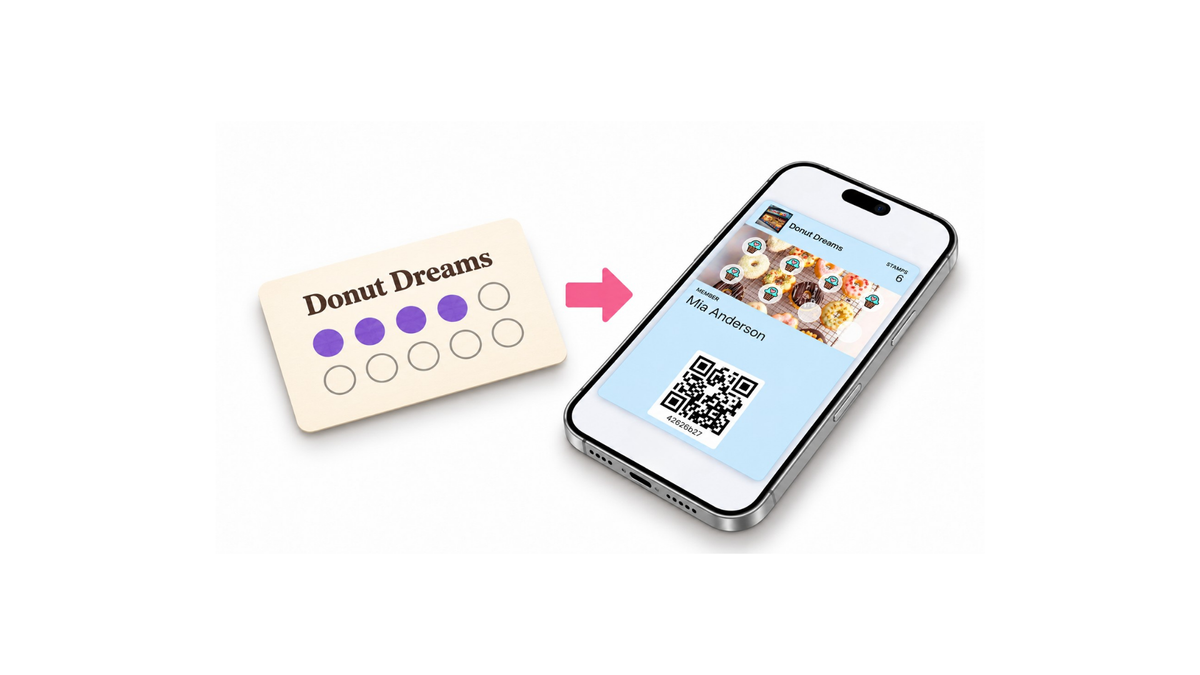
Paper stamp cards are a simple way to encourage customers to return. Customers make a purchase, receive a stamp, and earn a reward once they collect enough. This system is easy to understand, especially for cafés, bakeries, and businesses customers visit regularly.
Over time, however, problems can arise. Customers forget their cards at home, lose them, or start using several cards across different visits. Staff need to issue replacements at checkout. Businesses may also find it difficult to assess how many distributed cards are being used and how much interest the program generates.
Moving to digital loyalty cards gives you an opportunity to offer a familiar reward system through a new experience. A successful transition involves more than creating a card: you also need to plan your reward rules, decide how existing paper cards will be handled, and explain how customers can join.
This guide walks you through the steps for moving from paper cards to a digital loyalty program.
1. Review How Your Current Program Works
Before launching your digital program, review what works well in your paper card system and where customers encounter difficulties.
Do customers find the reward appealing?
Are they using their cards regularly?
Which questions come up most often at checkout?
For example, if customers use their cards but frequently forget to bring them, focus on making the program easier to access. If cards are distributed but rarely completed, consider whether the reward is appealing and achievable enough.
Observations from staff who speak with customers can help. Recurring questions such as “How many purchases do I need?”, “Does this product count?”, or “Has my card expired?” reveal which details should be clearer in your new program.
| Current issue | What to focus on during the transition |
|---|---|
| Customers frequently forget their cards | Clearly explain how to access and use the digital card |
| Customers repeatedly ask about reward conditions | Create shorter, clearer rules |
| Cards are distributed but rarely used | Review the reward’s value and how easy it is to earn |
| Different branches give different explanations | Establish a consistent program description and transition policy |
| Customers are unsure whether old cards remain valid | Announce acceptance conditions and transition dates |
This review helps you build a digital program around your customers’ actual needs.
2. Define Your Reward Rules
Before joining, customers should easily understand two things: what they need to do to earn a reward and what they will receive.
A short explanation such as “Get a free coffee after eight coffee purchases” communicates the basics. Internally, you also need to decide which products qualify, which products customers can redeem as rewards, and whether rewards can be combined with other offers.
| Rule to define | Example decision |
|---|---|
| Which transaction counts toward the reward? | Each eligible coffee purchase |
| How many transactions are required? | Eight coffee purchases |
| What does the customer receive? | One free coffee |
| Which products can be redeemed? | Standard-size coffees |
| Are extras included? | Syrups and similar additions are charged separately |
| Can the reward be combined with other discounts? | It cannot be used with other promotions |
These examples illustrate decisions your business can make. Apply your chosen conditions within the structure supported by your digital program.
The reward should also be sustainable for your business. When choosing something customers will value, consider product costs, purchase frequency, and average spending. A reward that is too difficult to earn may reduce interest, while one that is too easy to earn may create higher costs than expected.
If your current paper card reward structure works well, using a similar structure in your digital program can make the transition easier. Customers can learn the new signup process while keeping a familiar reward system.
3. Create Your Digital Card with Loyaltify
Once your reward structure is ready, you can begin setting up your digital loyalty program. Match the card’s appearance to your business identity with a recognizable logo, brand colors, and a short program description.
For instructions on creating an account, customizing your card, defining your reward structure, and preparing your signup form, see the Loyaltify Getting Started Guide.
When designing the card, imagine a customer seeing it for the first time. Is your business name easy to read? Is the reward clear? Is the wording short and understandable?
The information shown on the card or during signup should match your in-store announcements. If the checkout poster says “eight purchases” while another description says “eight visits,” customers may struggle to understand how they make progress.
Review the purpose of each signup field, too. Asking questions that are unnecessary for participation can make registration take longer, especially at checkout. Explain briefly and clearly why you need the information you request.
4. Set a Transition Period for Paper Cards
When launching your digital program, clearly explain what will happen to existing paper cards. Customers who are close to earning a reward will want to know whether their cards remain valid.
Depending on your business policy, you can let customers complete their existing paper cards or set a final date for accepting them. During the same period, you can direct new signups to the digital program.
Explain the conditions for the old paper cards and the new digital program separately. Customers should know which rules apply to each.
| Customer question | What your announcement should explain |
|---|---|
| When does the digital program begin? | The date customers can start joining |
| Is my existing paper card still valid? | The acceptance conditions for old cards |
| How long can I use my paper card? | The final acceptance date or completion conditions |
| How do I join the new program? | Where to find the QR code or signup link |
| What does the digital program offer? | The reward and how to earn it |
If you set a final acceptance date, give customers reasonable time to learn about it and use their cards. Display the date at checkout as well as on social media.
If you operate multiple locations, apply the transition conditions consistently across all branches. Hearing one rule at one location and a different rule elsewhere can reduce customers’ trust in the program.
5. Make Digital Signup Easy with a QR Code
Your digital program should be easy to notice in-store. A QR code displayed where customers pay or wait for their orders can be a useful starting point.
A QR code alone may not be enough. Tell customers why they should scan it:
Our loyalty card is now digital!
Get a free coffee after eight coffee purchases.
Scan the QR code to join.
This example shows both the signup step and the benefit. Adapt the wording to your own reward structure.
After placing the poster, test it from the customer’s perspective. Can the QR code be scanned from a normal distance? Is the text large enough? Is the poster hidden behind products or other notices? Does the code open the correct signup page?
The clearer and more visible the signup process is, the less explanation it needs at checkout.
6. Announce the Transition Across Your Channels
Share your in-store announcement on social media as well. Show the new card’s appearance, the reward, and how to join.
“Our digital loyalty program is here” is a starting point. Adding the next step makes the message more useful: “Scan the QR code in-store to join.”
| Announcement channel | Information to highlight |
|---|---|
| Checkout poster | The reward and QR-code signup |
| Tables or waiting area | A short explanation of the program |
| Social media post | The launch and how to join |
| Social media story | A brief reminder and signup link |
| Paper card transition notice | Existing card conditions and relevant dates |
7. Try the Digital Experience on a Small Scale
Before promoting the program widely, test signup and usage with a few customers. This trial can reveal problems that are difficult to spot during setup.
Before explaining every step, observe whether customers understand what to do by reading the announcement. If they consistently need help, simplify the poster’s message or signup instructions.
Test a real purchase scenario at checkout, too. Review the steps required for a customer to join, have their purchase recorded in the program, and redeem a reward when eligible.
| Step to check | What to look for |
|---|---|
| QR code | Does it open the correct signup page? |
| Signup form | Are the fields and explanations clear? |
| Program introduction | Does the customer understand how to earn a reward? |
| Checkout usage | Can the transaction be completed comfortably? |
| Reward redemption | Are the conditions applied correctly and consistently? |
If you operate multiple locations, starting at one branch can help you gain experience before expanding to the others.
8. Review Participation and Usage During the First Weeks
After launch, look beyond the number of cards created. Assess whether customers continue using the program after signing up.
New signups, return visits, and reward redemptions answer different questions. If signup is high but usage is low, customers may not understand how to access their card or what to do when making a purchase. If customers use the program but struggle to reach a reward, the earning conditions may need another look.
Track customer questions as well. If the same question comes up repeatedly, make the answer more visible.
For example, if customers often ask “Which products qualify?”, add that information to the program description.
Rather than changing the rules every week, first try to understand the cause of the problem. Sometimes, improving a single sentence in your announcement is enough.
Launch Your Digital Loyalty Program
Moving from paper stamp cards to digital loyalty works more smoothly with clear rules and a simple signup process. Start by defining your rewards, creating your digital card, and announcing the transition conditions for existing paper cards. Then test the experience before opening the program to your customers.
Create your digital loyalty card with Loyaltify and invite your customers to join your new program.