
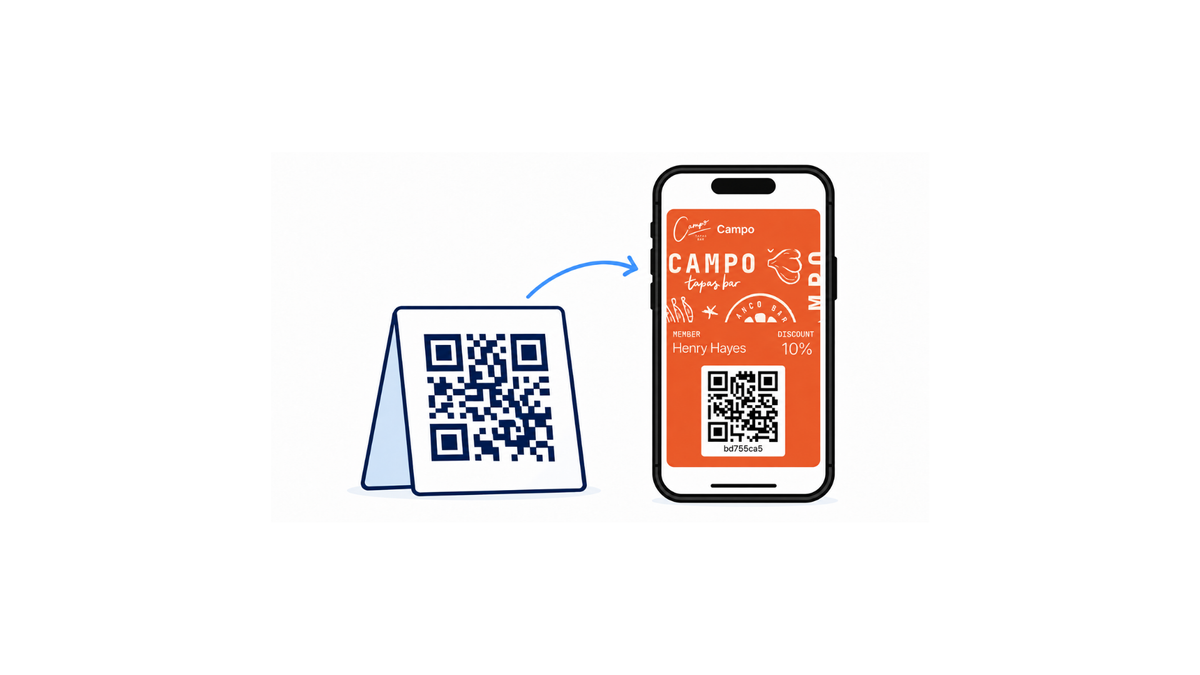
You can run a digital loyalty program without a website and without asking customers to download an app. The card lives in the customer's Apple Wallet or Google Wallet, customers join by scanning a QR code at your counter, and staff scan the card with a phone or tablet. This guide covers what you need, how long setup takes, when a POS connection is worth it, and how to switch platforms later without losing members.
Key takeaways
- Equipment: one phone or tablet with a camera, plus a printed QR code for signup. No new hardware, website or app.
- Delivery: customers save the card to Apple Wallet or Google Wallet from a QR code, an email or a text message.
- Setup: a standard stamp or points program is a configuration job, not a development job. Most small businesses can launch the same day.
- POS: a point-of-sale connection automates earning at checkout, but it isn't required to start.
- Switching later: make sure members, balances, history and program rules can all be exported before you commit to any platform.
What you actually need to launch digital loyalty without a website or app
The equipment list is short:
- A phone or tablet with a camera. It runs the scanner app staff use to add stamps or points and redeem rewards. A spare device you already own is enough.
- A way for customers to join. A printed QR code on the counter, a table tent or a receipt opens a short signup form. The customer enters a name and an email or phone number, and the card goes straight into their phone's wallet.
- A one-sentence staff routine. "Scan the card, confirm the stamp, hand the phone back."
That's the whole setup. You don't need a website, because the loyalty platform hosts the signup form and issues the card. You don't need an app, because Apple Wallet and Google Wallet are already on your customers' phones. Apple's documentation for loyalty passes in Apple Wallet lists QR codes, email, SMS, NFC tags and App Clips as ways to hand out a pass. Google Wallet supports loyalty cards issued by partner programs in the same way.
A point-of-sale (POS) connection is useful but optional. It's covered in its own section below.
How paper punch cards become digital wallet passes
A paper punch card does three jobs: it identifies the customer, counts visits, and proves a reward is due. A wallet pass does the same three jobs, but the count is kept in your dashboard instead of on cardstock, and the customer can't leave it at home.
At the counter, the change is small. Instead of handing over a card to be stamped, the customer opens the pass on their phone and shows the barcode. Staff scan it, the visit is recorded, and the stamp count on the customer's phone updates within seconds.
What you stop dealing with:
- Reprinting cards and buying stamps
- "I lost my card" conversations
- Customers collecting stamps they didn't earn
- Guessing who your regulars are
What you gain is a way to reach customers between visits. Wallet passes can show notifications on the lock screen, so a customer can be told when a reward unlocks or when they're close to one. That's a reason to come back that doesn't cost anything in ads.
If you're replacing an existing paper program, the simplest move is to keep the same rule (for example, "buy 9 coffees, get the 10th free") so regulars understand it immediately. Our store setup walkthrough covers the counter side in more detail.
How to send a loyalty card by email and launch without a website
There are three common ways to get a card onto a customer's phone, and none of them needs a website:
- QR code at the counter. Best for busy counters such as cafés, bakeries and takeaways. The customer scans, fills in a short form, and taps "Add to Apple Wallet" or "Add to Google Wallet." Staff don't type anything.
- Email. Best for appointment businesses such as salons, barbers, clinics and studios that already have a client list. The customer gets a link in their inbox and saves the card with one tap.
- Text message. Works the same way as email, for customers who'd rather give a phone number.
Most businesses use the QR code as the main route and email or SMS for customers who join at a booking or over the phone. Before you choose a platform, check which of these it supports and whether sending the card is automatic or a manual step.
On Google's side, some loyalty cards can also appear in Google Wallet automatically when the customer uses Gmail, which removes one more step for Android users.
Training takes a few minutes: show staff how to point customers to the QR code, how to scan a card, and how to redeem a reward. Write the routine on a sticky note by the till for the first week.
DIY setup or developer help: what changes the timeline
For most small businesses, launching a digital loyalty program is a configuration job. If you're issuing a standard stamp card or points card, you won't need a developer.
You can usually do this yourself:
- Design the card: logo, colors and reward text
- Set the earning rule, such as one stamp per visit or one point per euro
- Print the signup QR code
- Brief your staff
- Turn on reminders and notifications
You may want technical help for:
- Connecting a POS so points post automatically at checkout
- Importing an existing member list with balances
- Sending loyalty data to other tools through an API or webhooks
- Custom reporting
How long it takes:
| Setup | Typical time |
|---|---|
| Standard stamp or points card, scanned on a phone or tablet | Same day, often under an hour |
| Plus importing existing members | A few days, depending on the data |
| Plus a POS or custom integration | One to several weeks |
Card design is usually the fastest part. What slows a launch down is waiting on a POS integration or cleaning up an old member list, which is why many businesses launch with a standalone scanner first and connect other systems later.
What to check before connecting Square, Toast, or another POS
A POS connection matters when you want earning and redemption to happen automatically: the customer pays, points land, and a discount applies at checkout. If your rewards are based on visits rather than spend, you get most of the benefit from a phone or tablet scanner alone.
Square and Toast both offer loyalty features built into their own checkout. If every location already runs on one of them and you want everything in a single system, that's worth comparing. The tradeoff is that the program is tied to that POS: if you change registers, you're likely changing loyalty programs too.
A standalone wallet-pass program works the other way round. It runs next to whatever register you use, so switching POS doesn't touch your members or their balances.
Before you connect anything, check:
- Do you need spend-based rewards? If yes, a POS connection saves staff from entering amounts by hand.
- What data moves, and in which direction? For example, does the POS send the purchase amount and does the loyalty platform send back the discount?
- What happens if the connection fails? Staff should still be able to scan cards manually.
- Can you export your members? This matters most for loyalty that lives inside a POS.
How to switch platforms or POS providers without losing members
Moving a loyalty program is more than exporting a spreadsheet. Four things have to move together:
- Member identity: the email or phone number each customer signed up with
- Balances: current stamps, points or stored value
- History: past visits and redemptions
- Rules: how rewards are earned, what they cost, and when they expire
If balances move but the rules don't, the first week after the switch turns into manual corrections at the counter. If members have to sign up again from scratch, many of your regulars won't.
The riskiest part is converting between program types. A card with ten stamps for a free coffee doesn't turn into a points program cleanly unless you decide the exchange rate before you import. The aim is to move identity, balances, history and rules without breaking earning or redemption.
Ask any vendor before you sign:
- Can I export members, balances and history myself, in a standard file?
- Can you import members from my current program, and who checks that balances are correct?
- Do customers keep the card already on their phone, or do they have to re-enroll?
- If I change my POS, does anything happen to my loyalty program?
What this looks like in real stores
Loyaltify runs on exactly this setup: wallet passes, QR signup and a scanner app, with no customer app and no website required. More than 1,500 businesses have used the platform, issuing over 240,000 wallet passes, and customers have claimed more than 110,000 rewards.
The busiest programs show how far a phone-and-QR-code setup goes. Our most active stores, including two bakeries and a coffee brand, each recorded between 4,000 and 11,700 loyalty transactions in a recent 30-day period, all scanned on ordinary phones and tablets. Stores that join today get going quickly: a coffee shop that started in September and a padel club that started in August both passed 1,000 transactions a month within their first three months.
A simple launch plan for small businesses that want to start now
This week:
- Pick your reward. Keep your paper rule if you have one. If not, choose something simple, like a free item after nine visits.
- Design the card. Add your logo, colors and the reward text.
- Print the QR code and put it where customers wait: the counter, the till or the tables.
- Brief your staff on scanning and redeeming.
- Run it at one counter for two weeks, then roll it out everywhere.
Decide later, once you know what customers redeem:
- Whether to connect your POS
- Whether to add email or SMS campaigns
- Whether to import members from an old program
Choose a setup that will still work if you change your register, and check that you can export your members before you commit.
Loyaltify gets a wallet-based program running in minutes. Plans start at €16 a month billed annually, and every plan comes with a 14-day free trial.
Frequently asked questions
Can I add a loyalty program to my business without having a website?
Yes. The loyalty platform hosts the signup form and issues the card, so customers can join by scanning a QR code in your store. The card is saved to Apple Wallet or Google Wallet, and you never need a website of your own.
What equipment do I need to run a digital loyalty program in my store?
A phone or tablet with a camera to scan customer cards, and a printed QR code for signups. You don't need a card printer, a special scanner or new POS hardware.
How can I replace paper punch cards with a digital loyalty program?
Keep the same reward rule, print a signup QR code, and ask regulars to join the next time they visit. You can add their current paper stamps to the new digital card when they sign up so nobody loses progress.
How can I send a digital loyalty card to customers by email?
Collect the customer's email address at signup or from your booking list, and the platform sends a link that saves the card to their phone's wallet with one tap. Check that your platform supports email delivery and whether it is automatic.
Can I set up a digital loyalty program myself, or will I need a developer?
For a standard stamp or points card, you can do it yourself. A developer only becomes useful for custom POS integrations, importing large member lists, or connecting loyalty data to other systems through an API.
How long does it take to launch a digital loyalty program, including staff training?
A basic program can be live the same day, often in under an hour. Staff training takes a few minutes because the routine is the same every time: scan the card, confirm, hand the phone back. Importing old members or connecting a POS adds days or weeks.
How can I keep my loyalty program if I change POS providers later?
Use a loyalty program that runs separately from your POS, such as a wallet-pass program scanned on a phone or tablet. Changing registers then has no effect on your members. If your loyalty lives inside your POS, ask the vendor how to export members and balances before you switch.
How can I switch from one digital loyalty platform to another?
Export members, balances, history and reward rules from your current platform, agree on how balances convert if the program type changes, and confirm whether customers keep their existing card or need to re-enroll. Test the import with a small group before moving everyone.