
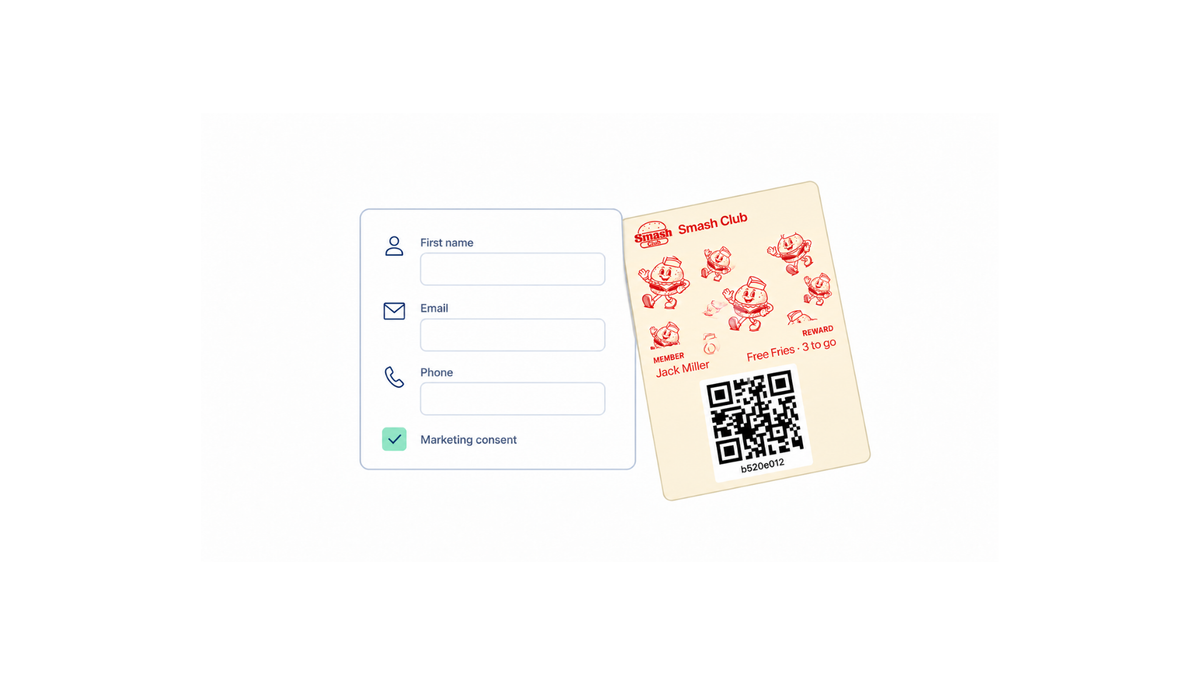
What to collect when customers join a loyalty program
The goal at signup is narrow: gather only the details you need to enroll a member, track their visits, and personalize rewards later. Nothing more. Every extra field is a reason for someone standing at the counter to say "maybe next time," and a half-finished form collects no data at all.
The opposite failure is just as real. Ask for too little and you can't tell one member from another, can't send a reward reminder, and can't see which customers actually come back. So the decision isn't "less data" it's the smallest set of fields that still lets your program function.
That balance is what the rest of this guide works through: the minimum fields worth asking for, what each one earns you in return, how wallet-based enrollment keeps the ask short, and the privacy questions to settle before you launch.
The context here is a digital loyalty program that lives in Apple Wallet or Google Wallet no physical cards, no app download. Wallet-based loyalty platforms, for example, build enrollment around a shareable link or QR code and let businesses choose which fields appear. Loyaltify works: a scannable pass, a configurable form.
Keeping customer enrollment and signup short is easy to set up. Deciding what belongs on the form takes a few minutes of thought.
The minimum fields to ask for at sign-up
Keep the form to what you actually need to issue a pass and reach the member later. Everything else can wait.
Required: the short list
- One contact method
Email or mobile number. This is the only field that genuinely decides whether you can send a reward reminder or a "two stamps to go" message later. - A first name
Enough to address messages and to confirm identity at the counter when someone says they lost their pass. - Consent to be contacted
A single checkbox, stated plainly, so your later messages are legitimate.
That's it. Three fields will enroll a member and connect every future purchase to their digital pass.
Optional: collect it later, not at the counter
- Birthday or birth month (useful for a once-a-year reward)
- Location or preferred branch
- Product or service preferences
- Demographic details, which loyalty programs are often used to build up over time, as E-Marketing Associates notes
These are worth having, but each one adds friction at the moment someone is standing at the till with a card in hand. Ask for them in a follow-up message once the pass is already in Apple Wallet or Google Wallet, when the member has a reason to answer.
How to decide your own mix
Pick fields based on how you plan to deliver rewards and talk to members. If your program runs on text reminders, the mobile number is required and email is optional. If you send a monthly offer by email, flip it. Collecting both "just in case" is the most common way to lose sign-ups.
Wallet-based customer enrollment and signup helps here because the form lives behind a shareable link or a QR code at the counter no app download, and you control which fields appear. Loyaltify's enrollment tooling works the same way a configurable signup where the practical difference is which fields you switch on, not the mechanism.
Why each field matters for tracking, rewards, and customer experience
Every field on a loyalty form should have a job. If you can't name the job, cut it.
A contact method is the backbone. An email address or mobile number is what links a pass to a person, so a stamp or point lands in the right account. It also gives you a recovery path when someone changes phones or deletes a wallet pass, and a channel for telling members their reward is ready. Wallet-based programs lean on this less than app-based ones an Apple Wallet or Google Wallet pass can push an update straight to the lock screen but you still want one contact field on record. E-Marketing Associates makes the same point about loyalty sign-ups feeding emails and phone numbers into a usable customer database.
A first name does light work, but real work. It lets staff confirm the right account at the counter and makes reward messages read like they came from a person rather than a system. Birthday, if you collect it, earns its place only if you actually send a birthday reward.
Demographic and preference data is optional by default. Favorite drink, preferred store, dietary preference these can sharpen segmented offers, but collect them only when you already know which campaign will use them. A field you never query is friction you charged the customer for.
That friction is the tradeoff worth watching. Loyalty program basics are consistent on this: the program has to be easy to join. Customer enrollment and signup happen in a queue, often on a phone, often while someone is paying. Two fields take seconds. Six fields invite a shrug.
The payoff for keeping the form short is measurable, not magical: more completed sign-ups means a larger member base to compare against non-members on repeat visits, average spend, and retention over a quarter. Data you can act on beats data you merely hold.
Low-friction signup flows for mobile wallet loyalty programs
A low-friction flow asks for the minimum at the moment of joining and lets the pass do the rest of the work. Three paths cover most small businesses.
Scan at the counter A QR code on the till, table tent, or receipt opens a signup page in the phone's browser. The customer types one or two essentials usually a first name plus either an email address or a mobile number taps submit, and adds the pass to Apple Wallet or Google Wallet. No app download, no password, no account creation. The whole thing takes under 30 seconds, which matters when there's a queue behind them.
Staff-assisted signup When a customer's hands are full, staff can take a single detail at checkout and send the pass link straight to them. The rule here is one question, not a form. Useful prompts at the register: "Are you a member of our rewards program?" and "Do you have any rewards to redeem today?" Both open the conversation without sounding like a data request, and both work for existing members too.
Post-purchase link Enrollment doesn't have to happen at the counter at all. A link in the payment receipt, the order confirmation email, or an SMS follow-up lets the customer complete signup on their own device, at their own pace. Conversion is lower than an in-person ask, but the fields you can reasonably request birthday, preferred location, communication consent go up, because nobody is waiting behind them.
Because the signup page is just a web page, it opens on a phone, tablet, or desktop, and the resulting pass lives in the wallet app already installed on the device. That's the practical advantage of wallet-based customer enrollment and signup over app-based programs: there's nothing to install, and no physical cards to reprint.
One design decision shapes all three paths: which fields appear on the form. Keep required fields to the identifier you'll actually use for messaging, mark everything else optional, and collect the extras later after the second or third visit, when the customer has a reason to care. BlueConic's guide to B2C loyalty programs makes a similar case for progressive data collection.
How to decide what to ask now and what to ask later
Use one test at the counter: does this field let you create the member record and deliver the first reward? If yes, ask it now. If no, it can wait.
Ask now (the working minimum)
- A first name, so messages and the pass don't read like a receipt.
- One contact channel email or mobile number chosen because it's the channel you'll actually use.
- Consent for marketing messages, logged with the date.
That's enough to issue a wallet pass, scan it on the next visit, and send a reward reminder. Everything else is enrichment.
Ask later (after they've joined)
Birthday, favorite product, store location, household size, dietary preferences, how they heard about you. None of these block the first stamp. Collect them once the member has something to lose: a short follow-up message a week in, an optional profile link inside the pass, or a question attached to a reward redemption ("tell us your birthday month and we'll add a treat"). Response rates tend to be better there than at a queue of three people.
Give every field a job before it goes on the form. If you can't name the message it triggers, the report it feeds, or the offer it personalizes, delete it. Four fields that get filled in beat nine that get abandoned.
Shortening the form doesn't cost you segmentation later purchase history starts accumulating from the first scan, and visit frequency, basket size, and timing are observed, not asked. Designing customer enrollment and signup this way means the data arrives in order of usefulness, not all at once.
Privacy and data-collection questions customers ask most often
The fastest way to lose someone at the counter is to ask for personal details without saying why. A single line next to the form what you collect, what it's used for removes most hesitation. Here are the questions that come up most, and the answers worth giving out loud.
Is it safe to hand over my details to join?
It is when the ask is narrow and explained. Collect what the program needs to run, keep marketing consent on its own checkbox rather than bundled into joining, and say how long you keep the record. If a customer asks who else sees the data, you should be able to answer in one sentence.
Can a program work if I only give one piece of information?
Yes. One identifier a phone number or an email address plus the visits you record is enough to issue stamps, track points, and confirm a reward belongs to the right person. Purchase history you build over time tells you more than birthday and postcode fields guessed at signup ever will.
What do you actually do with my phone number or email?
Three things: tying rewards to the right account, letting someone recover access if they change devices, and sending occasional program messages if they opted in. Say that plainly during customer enrollment and signup, and the field stops feeling like a trap.
Do I have to fill in every box?
Optional fields should stay optional and be marked as such. A name field left blank should still produce a working pass if it doesn't, it isn't optional, it's required with softer wording.
Is scanning a QR code or adding a wallet pass risky?
A digital pass sits in Apple Wallet or Google Wallet next to boarding passes and tickets, with no app download involved. The code scanned at the counter identifies the pass, not a payment card. And because the pass is tied to the original signup link, a customer who switches phones can usually restore it without handing over their details again.
A simple checklist for a cleaner loyalty signup form
Before you launch, run the form through one last pass. The rule holds across every business type: ask only for what you need to create the pass and deliver the reward. For most SMBs that's a first name plus one contact channel email or phone and nothing else sitting behind a required asterisk.
Use this as a pre-launch review:
- Required fields: keep them to identity and reward delivery. If you can't name the exact workflow a field feeds, it isn't required.
- Optional enrichment: birthday, location, favorite product, communication preferences. Collect these later, inside the pass or after the second visit not at the counter with three people waiting.
- Consent: make marketing opt-in a separate, explicit choice rather than a condition of joining.
- Device check: open the signup link on a real phone. The pass should land in Apple Wallet or Google Wallet in a few taps, with no app download and no physical cards involved.
- Prompt clarity: one sentence explaining what the customer gets, written for someone reading it in ten seconds.
Then do the part most teams skip: fill out your own form as a customer would, at the counter, during a rush. Count the taps. Count the keystrokes. Anything that makes you hesitate will make a stranger abandon. If a staff member has to explain a field out loud, rewrite the label or cut the field.
The simplest improvement to customer enrollment is almost always subtraction fewer steps, plainer prompts, and a reward that's visible before the customer commits. Measure it after launch, too: sign-ups per week and the share of people who open the link but don't finish will tell you which field is costing you members.
If you're building or tightening a digital loyalty program around wallet passes, start free with Loyaltify and configure your signup fields before your first pass goes out.